Playing around with Local LLMs
Like many, I’ve started to get really bullish on the future of local LLMs - the open models and weights are getting better every few weeks. Qualitatively, I think it’s still abundantly clear that local LLMs are not at par with the larger hosted models for my high-priority use cases like coding.
That all said, it’s a matter of time.
How do you run local LLMs? #
llama.cpp has been a good harness:
- It’s able to run most of the modern models without issue.
- It has a simple command,
llama-server, for serving the model text-completion API interface that is commonly used by harnesses.
Using it is as simple as downloading the prebuilt binaries from the GitHub. More ideally you build from source, which can sometimes improve support for your GPU as the build can detect it and compile itself appropriately.
llama.cpp works with models that are saved in the gguf format. I’ve found that unsloth.ai’s huggingface collections have most models I’ve wanted to try.
I grab a model and serve it from my NVidia Spark DGX at port 0.0.0.0 so my other machines can access it:
llama-server -hf unsloth/gemma-4-E4B-it-GGUF:UD-Q4_K_XL -h 0.0.0.0
What impacts the runtime latency of a model #
A critical aspect of local models is the runtime latency - I think roughly 60 tokens / second is the sweet spot, producing a good amount of code quickly without having to shift my focus for long periods of time.
It’s a bit reductionist to boil things down to a few specific parameters, but with the model’s I’ve been testing I think the general factors I see are:
- Total size of the weights: a combination of total parameter count * data format (fp16, fp8, int8, and lower). Running models with larger weights is bottle-necked by the total amount of dram that your GPU supports (i.e. the DGX spark has 128GB of unified memory available).
- The size of the effective weights: using techniques like mixture of experts, not all weights are utilized on each inference run. Although the weights still need to be loaded into dram to ensure they can be quickly read for each token prediction. This is limited by memory bandwidth to load the values by GPU, or in rarer cases the tops.
What models work well? #
Qwen3.6-27b #
I’ve heard this is a great model, but the 7-8 token/s were not enough for me to be truly productive: especially with the amount of thinking it does, it barely gets to a tool call within the span of 10 minutes. Even with multi-token-prediction (MTP) where a speedup is expected, it is just too slow.
Qwen3-code-next #
I’ve found that this has been fairly productive - at 60+ tok/s it’s able to produce code efficiently, and call tools appropriately. I’ve had it write a couple changes to vs code extensions, or add features to fairly large frontend applications.
It is definitely not as robust as my go-tos: Cursor’s default and Gemini flash 3.5 medium: both can make these changes and test them without issue.
Where do local models fall short? #
Despite my enthusiasm, local models are still no where near good enough to replace all use cases I have for larger models. Examples include:
- Getting stuck into loops: even on relatively simple solutions (remove all translucent panels in this react page), it will get stuck in a loop where it redoes and undoes the change, because it keeps second-guessing itself.
- Requiring very specific instructions: with models like Gemini-3.5-medium I can just say “add a copy to jira link on the issue page”. With Qwen3-coder-next I have to give a precise list of steps, sometimes mentioning what files to touch.
- With all the local models I’ve tried, I’ve had to give specific feedback after the change as well - in some cases the feature is entirely incorrect (e.g. access to the Jira API doesn’t work).
But in some cases it’s able to read the codebase, produce fixes, and resolve them without personal intervention. I couldn’t imagine a local model that I can run on a tiny computer on my desk being capable of that a year ago.
Conclusion #
Although local LLMs aren’t all I need yet, it’s very easy to see a future where that may be the case. It’s going to be a combination of:
- Better models that need fewer weights to achieve similar benchmarks.
- Increased memory storage to enable models with a larger number of total parameters.
- Increased memory bandwidth and/or flops to enable running models at much faster tokens / second for larger effective weights.
Side quest: Profiling my GPU #
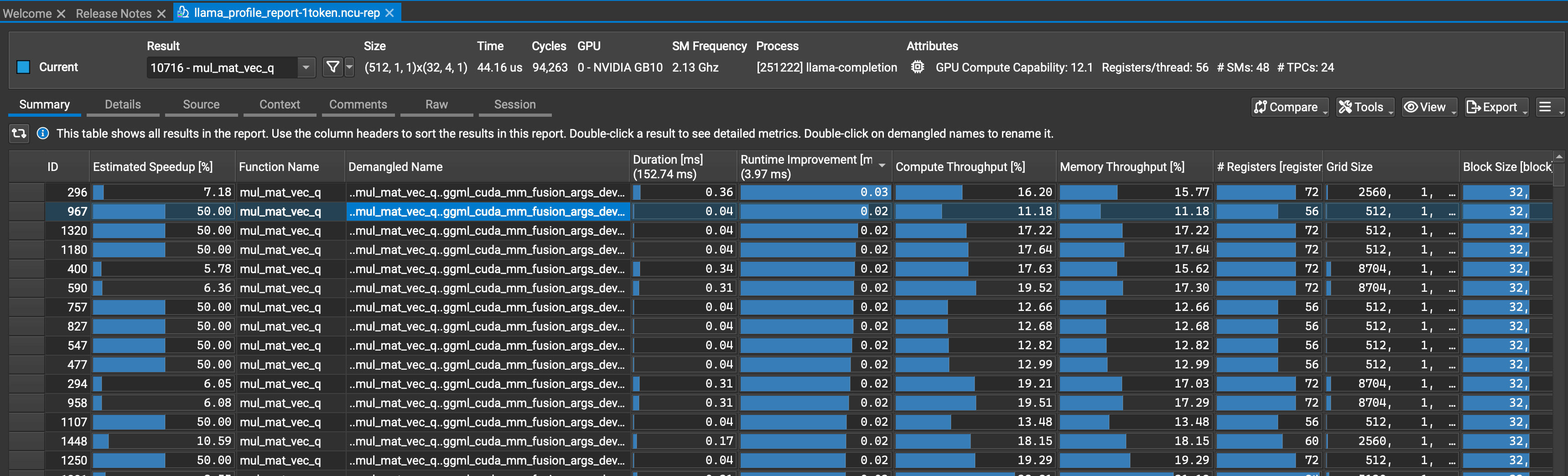
I really wanted to get Qwen 3.6 working, so I tried to profile the execution of the model. To do so on an NVidia GPU, one can use Nvidia Nsight Systems to get a sense of the kernels that have the longest runtime:
nsys -o llama_profile ./build/bin/llama-cli -hf ${MODEL} -p "The quick brown fox" -n 5 --no-conversation
Then produce a match that looks at the specific kernels in question:
sudo -E /usr/local/cuda/bin/ncu -f -k regex:'(quantize_q8_1|mul_mat_vec_q|k_bin_bcast|k_get_rows_float)' -o $PWD/llama_profile_report ~/bin/llama-completion -hf ${MODEL} -p "The quick brown fox" -n 1 -no-cnv
What’s interesting about this investigation is that I found that the workload is neither saturating compute nor memory bandwidth - the SM activation actually seems to be somewhat uneven, perhaps due to sparse matrix multiplication. Something I plan on looking at, with a write up in the future.